
Table of Contents
- What Is Gemini Omni?
- Key Features & Capabilities
- How Gemini Omni Works
- Gemini Omni Flash: Available Now
- AI Avatars for Marketing
- Gemini Omni vs Veo Comparison
- Marketing Impact & ROI
- How to Access Gemini Omni
- Safety & Content Verification
- FAQ
What Is Gemini Omni?
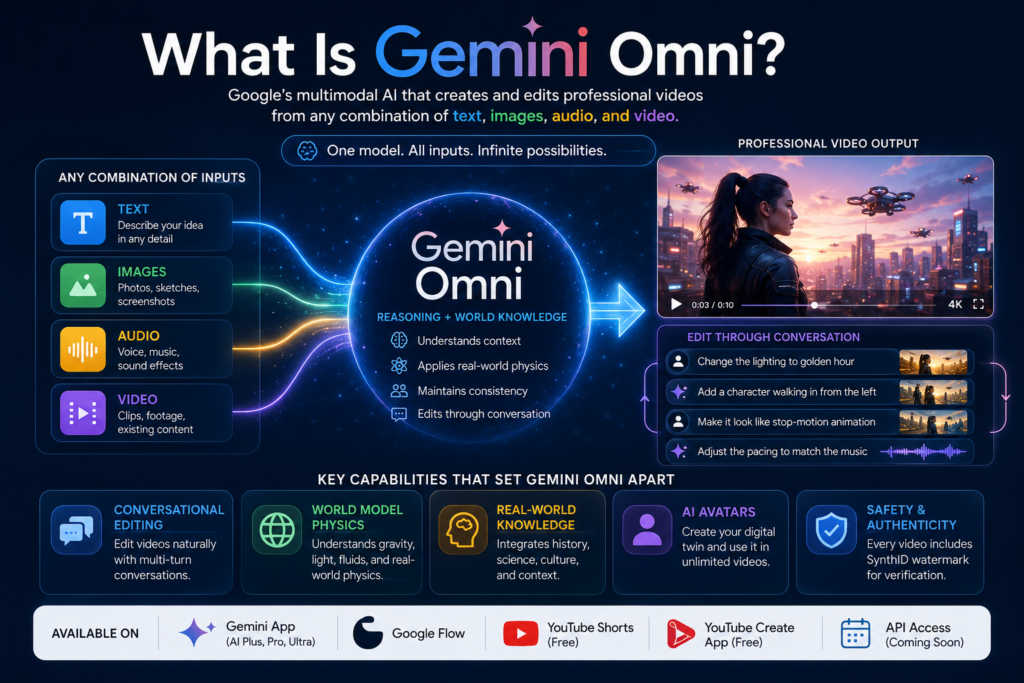
Gemini Omni is Google’s latest multimodal AI model family, announced at Google I/O 2026 on May 19. Unlike traditional AI tools that process single media types, Gemini Omni creates professional-grade videos from any combination of inputs: text descriptions, photographs, audio clips, and existing video footage.
The AI Video Revolution
For the first time, marketers and creators can generate cinematic video content without expensive equipment, large production teams, or extensive technical knowledge. Gemini Omni bridges the gap between creative vision and execution in minutes—not weeks.
Key Insight: Gemini Omni positions Google AI beyond chatbots. It’s evolving into a continuous AI system that understands context, anticipates needs, and generates media with minimal instruction.
Where Gemini Omni Fits in Google’s AI Stack
| AI Tool | Release | Primary Function |
|---|---|---|
| Nano Banana | 2025 | Image generation & editing |
| Veo 3.1 | 2025 | Text-to-video generation |
| Gemini 3.5 Flash | May 2026 | Fast reasoning & workflows |
| Gemini Omni | May 19, 2026 | Create anything from any input |
Nano Banana pioneered AI-native image generation for Gemini. Now, Gemini Omni extends this multimodal foundation to video—taking the next evolutionary leap.
Key Features & Capabilities
Gemini Omni includes revolutionary capabilities that set it apart from every other AI video tool. Here’s what makes it game-changing:
Conversational Video Editing (Natural Language Control)
The most revolutionary feature is natural language editing. Instead of manually adjusting frames, you simply describe changes. Gemini Omni applies edits while maintaining:
- Character consistency across scenes
- Physics accuracy throughout the video
- Scene context from previous instructions
Real-World Example:
User: "Make this sculpture out of bubbles"
Output: Objects transform with realistic bubble physics and reflections

User: "Change the background to a sunset beach"
Output: Subject remains consistent; environment shifts with correct lighting
World Model Physics
This is what separates Gemini Omni from competitors. The model understands real-world physics at the scene level:
- Gravity & kinetic energy — objects fall realistically
- Fluid dynamics — water behaves naturally
- Light physics — shadows and reflections adjust correctly
- Physics reasoning — when backgrounds change, the model re-reasons physical relationships between subjects, environments, and light sources
When you swap a background, Gemini Omni doesn’t just paste layers. It re-simulates the entire physical scene, making generated videos indistinguishable from reality.
Real-World Knowledge Integration
Gemini Omni combines inputs while understanding:
- Historical references and accuracy
- Scientific logic and terminology
- Cultural context and nuance
- Physics principles and constraints
This means you can reference “1920s film noir” or “bioluminescent deep-sea creatures,” and the model generates cinematically accurate output.
Multi-Turn Editing Without Restarting
Unlike conventional AI video tools that require repeated prompts, Gemini Omni maintains conversation continuity:
- Edit across multiple turns without restarting
- Characters remain consistent
- Previous edits inform new ones
- Alter environments, actions, or objects while preserving scene flow
Transform Any Video Into Something New
Your existing video becomes the creative starting point:
- Add physics-aware special effects
- Change entire visual aesthetics
- Insert new dynamic elements
- Modify specific scenes or everything
How Gemini Omni Works: Step-by-Step
The Complete Workflow
Step 1: Combine Your Inputs
- 📝 Text prompts (describe your vision)
- 📷 Images (photos, sketches, screenshots)
- 🎵 Audio (voice references, music)
- 🎬 Video clips (existing footage)
Gemini Omni accepts all four input types simultaneously—not sequentially.
Step 2: Gemini Reasons Across All Inputs
- AI understands narrative flow and context
- Draws on world knowledge (history, science, culture)
- Applies physics reasoning to all elements
- Reconciles conflicting inputs into cohesive output
Step 3: Video Is Generated
- High-resolution video output (up to 10 seconds at launch)
- Includes synchronized audio
- Applied physics and world knowledge
- Maintains input consistency
Step 4: Edit Through Conversation
"Change the lighting to golden hour"
↓
"Add a character walking in from the left"
↓
"Make it look like stop-motion animation"
↓
"Adjust the pacing to match the background music"
Each edit builds on the last—no restarting required.
Step 5: Export & Share
- Download high-resolution MP4
- Direct share to YouTube Shorts
- Post to Instagram Reels, TikTok
- Embed in websites or emails
Architecture: Why Gemini Omni Is Different
Traditional AI Video Tools:
- Text-to-video (separate)
- Image-to-video (separate)
- Post-production editing (separate)
- Audio matching (separate)
Gemini Omni:
- Transformer-based with native multimodal support
- All inputs processed simultaneously
- Single unified workflow
- Reasoning layer + generation layer
By fusing Gemini’s reasoning engine with native multimodal generation, Google collapsed what used to require four separate tools into one conversational interface.
Gemini Omni Flash: What’s Available Right Now
Gemini Omni Flash is the first publicly available model in the Omni family, rolling out immediately to select platforms.
Availability & Pricing
| Platform | Access | Cost | Launch |
|---|---|---|---|
| Gemini App | AI Plus, Pro, Ultra subscribers | From $7.99/mo | Live |
| Google Flow | Included with subscription | Included | Live |
| YouTube Shorts | All YouTube users | Free | This week |
| YouTube Create App | All YouTube users | Free | This week |
| Enterprise API | Developers & businesses | Custom | Coming weeks |
Current Specifications & Limitations
| Feature | Status | Details |
|---|---|---|
| Video Output | ✅ Available | Up to 10 seconds, high-resolution with audio |
| Image Output | 🔜 Coming | Image generation from text/mixed inputs |
| Audio Output | 🔜 Coming | Standalone audio generation |
| Speech Editing | 🔜 Restricted | Under responsible AI testing |
| Audio Input | ✅ Available | Voice references at launch |
Why 10 Seconds? Google states this is a deployment decision, not a model limitation. The decision prioritizes:
- Broader access to more users
- Alignment with short-form video consumption (Shorts, Reels, TikTok)
- Faster generation times
- Lower computational requirements
Longer-form capabilities are expected in future updates.
RankMath Recommendation for This Section
Add FAQ Schema markup for featured snippets:
- “Can I create videos longer than 10 seconds with Gemini Omni?” (No, currently max 10 seconds)
- “How much does Gemini Omni cost?” (Free on YouTube, $7.99+ on Gemini app)
AI Avatars: Create Your Digital Twin
One of the most exciting features is the ability to create a digital avatar that looks and sounds like you—then deploy it in generated videos without re-uploading reference material each time.
How Avatar Creation Works
The Onboarding Process:
- Record yourself (short video)
- Speak a series of numbers (voice verification)
- Avatar is created and stored
- Use in unlimited videos going forward
Safety by Design: This prevents deepfakes by requiring identity verification during onboarding.
Marketing Use Cases for Avatars
| Use Case | Benefit | Time Savings |
|---|---|---|
| Social Media Content at Scale | Create dozens of videos without filming | 80-90% faster |
| Product Announcements | Your avatar delivers the message—no studio needed | 60-75% faster |
| Multi-Language Content | Same avatar, different language voice-overs | 5x faster localization |
| Training & Tutorial Videos | Produce educational content rapidly | 70% faster production |
| YouTube Shorts & Reels | Consistent brand presence without daily filming | 80% time reduction |
| Thought Leadership Content | Avatar posts articles, interviews, commentary | Infinite scalability |
| Customer Service Videos | Personalized support content at scale | 90% faster deployment |
Real ROI Impact: A creator producing 4 videos per week could scale to 20+ videos weekly with avatar-based content.
SynthID Watermark on All Avatar Videos
Every video created with Gemini Omni—including avatar videos—includes Google’s imperceptible SynthID digital watermark. This allows viewers to verify authenticity through:
- Gemini App verification tool
- Chrome extension verification
- Google Search verification
Gemini Omni vs Veo: The Definitive Comparison
Many marketers confuse Gemini Omni with Google’s existing Veo video model. Here’s the critical difference:
Feature Comparison Table
| Feature | Veo 3.1 | Gemini Omni Flash |
|---|---|---|
| Input Types | Text + Images only | Text + Images + Audio + Video |
| Conversational Editing | ❌ No | ✅ Yes (multi-turn) |
| World Knowledge | Limited | ✅ History, science, culture, physics |
| Physics Understanding | Basic | ✅ Advanced (gravity, fluids, kinetics) |
| AI Avatar Tool | Limited | ✅ Full avatar creation |
| Character Consistency | Often drifts | ✅ Maintains across edits |
| Architecture | Standalone video model | Gemini reasoning + generation |
| YouTube Integration | ❌ No | ✅ YouTube Shorts & Create app |
| API Availability | ✅ Available (GA) | 🔜 Coming in weeks |
Why Gemini Omni Is Superior
Veo 3.1 remains Google’s specialized video generation model—optimized for pure text-to-video tasks. But Gemini Omni represents a paradigm shift:
- Reasoning Layer: Gemini’s language understanding is baked in. Veo lacks this reasoning component.
- All Inputs Simultaneously: Veo processes text + images in sequence. Omni reconciles all four inputs at once.
- Multi-Turn Editing: Veo requires separate prompts for each edit. Omni maintains context across edits.
- Physics Simulation: Veo uses basic physics. Omni reasons about gravity, light, fluid dynamics.
Bottom Line: Veo is for specialized video generation. Omni is for creative conversation with AI.
Migration Path
If you’re currently using Veo, consider Gemini Omni when:
- You need conversational editing
- You’re combining multiple input types
- Character consistency matters
- You want faster iteration cycles
- You need avatar features
How Gemini Omni Impacts Digital Marketing
This is where Gemini Omni transforms business economics. It’s not just a cool tool—it’s a cost-cutting, velocity-accelerating machine for marketing teams.
1. Dramatic Cost Reduction for Video Production
Current Market Reality:
- Average small business video budget: $2,000–$10,000/month
- Industry projection: AI video tools reduce costs 30–50%
For a Business Spending $5,000/Month:
- Annual savings: $18,000–$30,000
- Plus time savings (days compressed to hours)
- Quality improvement (professional output without studio)
Affected Industries (Disruption Alert):
- Production houses
- Post-production firms
- Motion graphics studios
- Influencer marketing agencies
- Freelance video editors
For creators (YouTubers, podcasters, Instagram creators), Gemini Omni becomes a low-cost production engine—enabling high-quality output without large teams or expensive software.
2. ⏱️ Faster Production Cycles = Higher ROAS
Marketing teams operating under deadline pressure benefit most:
- A/B testing acceleration: Test 10 ad variations in hours (not weeks)
- Paid ad optimization: Identify high-performing creative faster
- Campaign iteration: Update creative based on real-time performance data
- Seasonal content: Rapid turnaround for trending topics
Example Timeline:
Traditional Workflow:
Monday: Creative brief → Thursday: Shoot footage → Next Monday: Edit complete

Gemini Omni Workflow:
Monday morning: Write prompts → Monday 2 PM: 5 video variations ready
ROAS Impact: Faster iteration directly correlates to higher return on ad spend in competitive campaigns.
3. 📈 SEO & Content Visibility Advantage
Beyond pure creative use, video generation influences search visibility:
Google’s AI Overviews Now Surface Video
- Video content appears directly in search results
- Short-form clips capture “answer position” for how-to queries
- Answer engines (AEO) pull from rich-media indexes
Competitive Advantage: Brands producing high-quality vertical video at scale gain visibility in:
- GEO results (Google’s generative search)
- AEO results (Answer engine optimization)
- Video SERP positions (YouTube integration)
Strategy: Brands that adopt Gemini Omni early capture untapped video search positions before competitors.
4. Content Velocity: 5–10x More Output
With avatar features and conversational editing, content teams can scale output dramatically:
| Team Size | Current Output | With Gemini Omni | Increase |
|---|---|---|---|
| 1 creator | 4 videos/week | 25–40 videos/week | 6–10x |
| 2 creators | 8 videos/week | 60–80 videos/week | 7–10x |
| 3 creators | 12 videos/week | 100+ videos/week | 8–10x |
Why? Avatar-based content removes filming bottleneck. Generate unlimited variations from single avatar recording.
How Different Teams Can Use Gemini Omni
| Marketing Function | Specific Use Case | Expected Impact |
|---|---|---|
| Social Media | Daily YouTube Shorts, Instagram Reels, TikToks | 5–10x more content |
| Paid Advertising | Multiple ad variations for A/B testing | Better ROAS, faster optimization |
| SEO | Video content for search rankings | Capture video SERP positions |
| Email Marketing | Personalized video in campaigns | Higher CTR & engagement |
| Brand Content | Avatar-based thought leadership | Scale personal branding infinitely |
| eCommerce | Product demos & lifestyle videos | Lower cost per asset |
| Agency Services | Rapid video production for clients | Faster delivery, higher margins |
Where to Access Gemini Omni
For Individual Creators & Marketers
| Platform | How to Access | Cost | Best For |
|---|---|---|---|
| Gemini App | Download → Subscribe (AI Plus/Pro/Ultra) | $7.99+/mo | Individual creators |
| Google Flow | Visit flow.google.com → Sign in | Included | Quick projects |
| YouTube Shorts | Open YouTube → Create → Remix | Free | Social media creators |
| YouTube Create App | Download from App Store/Play Store | Free | Mobile creators |
For Businesses & Developers
Gemini Omni Flash rolls out to developers and enterprises via:
- Gemini API
- Agent Platform API
- Custom enterprise deployments
Expected Timeline: Coming in weeks (as of May 2026)
Google AI Subscription Tiers
| Tier | Monthly Cost | Annual Cost | Best For |
|---|---|---|---|
| AI Plus | $7.99 | $95.88 | Individual creators, freelancers |
| AI Pro | $19.99 | $239.88 | Professional marketers, agencies |
| AI Ultra | $249.99 | $2,999.88 | Large studios, high-volume agencies |
Money-Saving Tip: Annual subscriptions offer 16% savings vs. monthly billing.
Safety & Content Verification
Google built multiple safety layers into Gemini Omni to prevent misuse and maintain content authenticity.
SynthID: Imperceptible Digital Watermarking
The Technology:
- Every video generated by Gemini Omni includes an invisible SynthID watermark
- Watermark cannot be removed or stripped
- Unlike traditional watermarks, it’s imperceptible to viewers
- Embeds AI-generation information into video at the data level
Verification Methods: Users can verify if a video was AI-generated through:
- Gemini App verification tool
- Chrome extension for verification
- Google Search integration (coming)
Why This Matters: In an era of deepfakes, SynthID provides cryptographic proof of AI origin—protecting creators and viewers.
Avatar Safety Measures
Multi-Step Verification to Prevent Deepfakes:
- Record yourself (video recording)
- Speak a series of numbers (voice biometric)
- Identity verification process
- Avatar creation locked to your account
- Usage restrictions and logging
This prevents bad actors from creating avatars of celebrities or public figures without consent.
Speech Editing: Responsibly Withheld (For Now)
Current Status: Google deliberately restricts speech editing capabilities.
Why? While Gemini Omni can manipulate video content, editing someone’s voice without consent raises ethical and legal concerns. Google is still testing and developing responsible deployment standards.
Expected Timeline: Speech editing coming “responsibly” in future updates.
Content Policy Best Practices
When using Gemini Omni, ensure videos comply with:
- YouTube Community Guidelines
- Platform-specific content policies
- Disclosure of AI generation (recommended)
- Copyright and intellectual property laws
- Local regulations on synthetic media
The Bottom Line: What Gemini Omni Means for Your Business
Gemini Omni represents the moment when video generation graduates from specialized AI category into general-purpose creative layer inside everyday productivity tools.
The implications for business are immediate and significant:
Quantified Impact
✅ Video Production Costs: Drop 30–50%
✅ Content Velocity: Increase 5–10x
✅ A/B Testing Speed: Compress days into hours
✅ Personal Branding: Scale infinitely with avatars
✅ Search Visibility: Improve with more video content
✅ Time to Market: Reduce from weeks to hours
✅ Production Quality: Professional without studio
First-Mover Advantage
Businesses that adopt Gemini Omni early gain massive competitive advantages:
- Lower cost per video asset
- Faster content iteration
- More experimental creative
- Better A/B testing data
- Improved search rankings
- Higher content velocity
The Next Phase of AI
The launch makes one thing clear: the next phase of AI competition is moving rapidly from text generation into full-scale media creation.
Text generation was the 2022–2024 story. Media generation (video, audio, images) is the 2025–2026 story. Companies that master multimodal AI will dominate marketing and creative industries.
Frequently Asked Questions About Gemini Omni
Q1: What is Gemini Omni exactly?
A: Gemini Omni is Google’s multimodal AI model family that creates and edits professional-quality videos from any combination of text, images, audio, and video inputs using natural conversational language. Announced at Google I/O 2026 on May 19, it’s the first AI model to combine Gemini’s reasoning intelligence with native media generation.
Q2: Is Gemini Omni free?
A: Partially.
- Free: YouTube Shorts, YouTube Create App
- Paid: Gemini App ($7.99/mo for AI Plus), Google Flow (included in subscription), Enterprise API (custom pricing)
Q3: What’s the difference between Gemini Omni and Veo?
A: Gemini Omni and Veo are separate model lines:
- Veo 3.1 = Specialized text-to-video model (Google’s standalone video line)
- Gemini Omni = Reasoning + video creation + conversational editing + all four input types
Omni collapses what Veo does (plus more) into a single, reasoning-enabled system.
Q4: Can Gemini Omni create an AI avatar of me?
A: Yes. The process:
- Record yourself speaking
- Speak a series of numbers (voice verification)
- Avatar is created and stored
- Deploy in unlimited videos
All avatar videos include SynthID watermarks for authentication.
Q5: How long can Gemini Omni videos be?
A: At launch, 10 seconds maximum. Google states this is a deployment decision, not a limitation. Longer durations expected in future updates.
Q6: How do I use Gemini Omni for my marketing?
A: Use cases:
- Social Media: Daily short-form content (Shorts, Reels)
- Paid Ads: Multiple variations for A/B testing
- SEO: Video content for search rankings
- Email: Personalized video in campaigns
- Avatars: Thought leadership at scale
- eCommerce: Product demos rapidly
Cost savings: 30–50% reduction vs. traditional production
Q7: Can people tell it’s AI-generated?
A: Every Gemini Omni video includes an imperceptible SynthID watermark. Viewers can verify authenticity through:
- Gemini App verification
- Chrome extension
- Google Search (coming)
Google deliberately withheld speech editing until responsible standards are established.
Q8: When will Gemini Omni API be available for developers?
A: Gemini API and Agent Platform API access coming “in weeks” (as of May 2026). Enterprise customers should contact Google directly for early access.
Q9: What are the best use cases for Gemini Omni avatars?
A: Top use cases:
- Multi-language content creation (1 avatar, multiple languages)
- Consistent brand presence (same avatar across all platforms)
- Thought leadership (avatar records commentary, insights)
- Training videos (rapid educational content)
- Product announcements (no studio needed)
- Customer service (personalized support videos)
Q10: Is Gemini Omni better than other AI video tools?
A: Gemini Omni’s advantages:
- Conversational editing (unique feature)
- Physics reasoning (advanced vs. competitors)
- Multi-input support (all four types simultaneously)
- YouTube integration (direct access)
- Avatar features (built-in, not bolted-on)
Competitors (Runway, Synthesia) offer specialized features, but Omni’s reasoning layer sets it apart.
Ready to Transform Your Video Production?
Gemini Omni represents the future of marketing content. Early adopters will dominate their categories through superior content velocity, lower costs, and faster iteration.
The question isn’t whether to adopt Gemini Omni. It’s how quickly you can integrate it into your workflow.
Next Steps
- Create a Google Account (if you don’t have one)
- Access YouTube Shorts or Gemini App (free or $7.99/mo)
- Experiment with simple prompts (test the workflow)
- Scale to your team (train colleagues)
- Measure impact (track cost savings & velocity gains)
The future of video marketing is conversational, multimodal, and AI-powered. Gemini Omni is the tool that makes it possible.